
Withdrawing money from AD786 Game is simple if you follow the correct steps. The platform supports popular payment methods like JazzCash and EasyPaisa, making withdrawals fast and convenient. For official guides and updates, always visit AD786 Game.
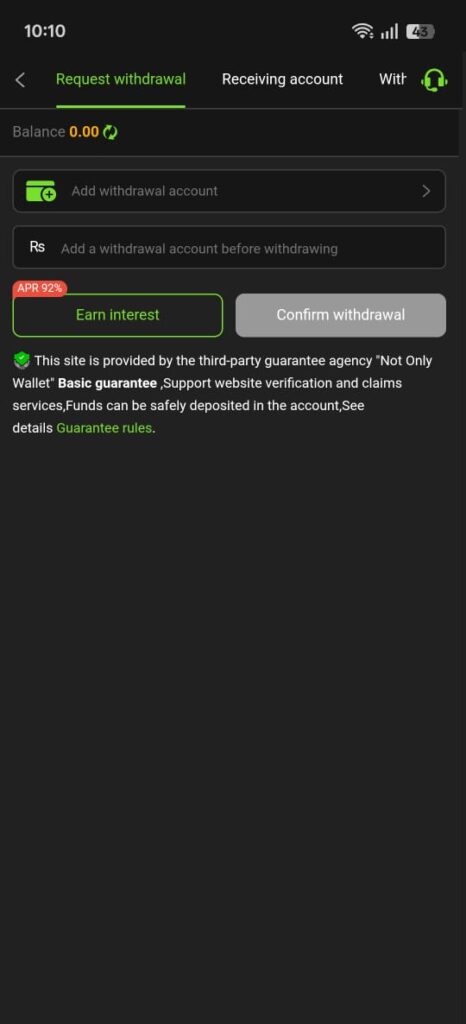
Before You Withdraw
Make sure that:
- You are logged in to your AD786 Game account
- Your wallet has sufficient balance
- Your JazzCash or EasyPaisa account is active
- Your account details are entered correctly
Step-by-Step Withdrawal Process
Step 1: Login to Your Account
Open the official website or app of AD786 Game and log in with your registered details.
Step 2: Go to the Withdraw Section
From your dashboard, click on the Withdraw or Cash Out option to open the withdrawal page.
Step 3: Select Withdrawal Method
Choose your preferred payment method:
- JazzCash
- EasyPaisa
Step 4: Enter Withdrawal Details
Provide the required information, such as:
- Withdrawal amount
- JazzCash or EasyPaisa mobile number
- Account holder name (if required)
Double-check all details before submitting.
Step 5: Submit Withdrawal Request
Click on the Submit or Confirm button. Your withdrawal request will be sent for processing.
Withdrawal Processing Time
- Most withdrawals are processed within a few minutes
- In some cases, it may take a few hours
- You will receive a confirmation once the amount is transferred
Important Withdrawal Tips
- Use the same mobile number linked to your payment account
- Follow minimum and maximum withdrawal limits
- Do not submit multiple requests at the same time
- Contact support if payment is delayed
Final Words
Withdrawing money from AD786 Game through JazzCash and EasyPaisa is easy when done correctly. Always use official channels and verify your details before submitting a request. For more guides, tips, and updates, visit AD786 Game regularly.